
CursorGleam
Highlight your cursor, click ripples, and laser pointer for presentations, recordings, and meetings on macOS.
Try all highlight and laser features unrestricted for 7 days. Unlock permanently via a single one-time purchase. Zero subscriptions, zero automatic renewal charges.
Instantly open in App Store
CursorGleam on macOS
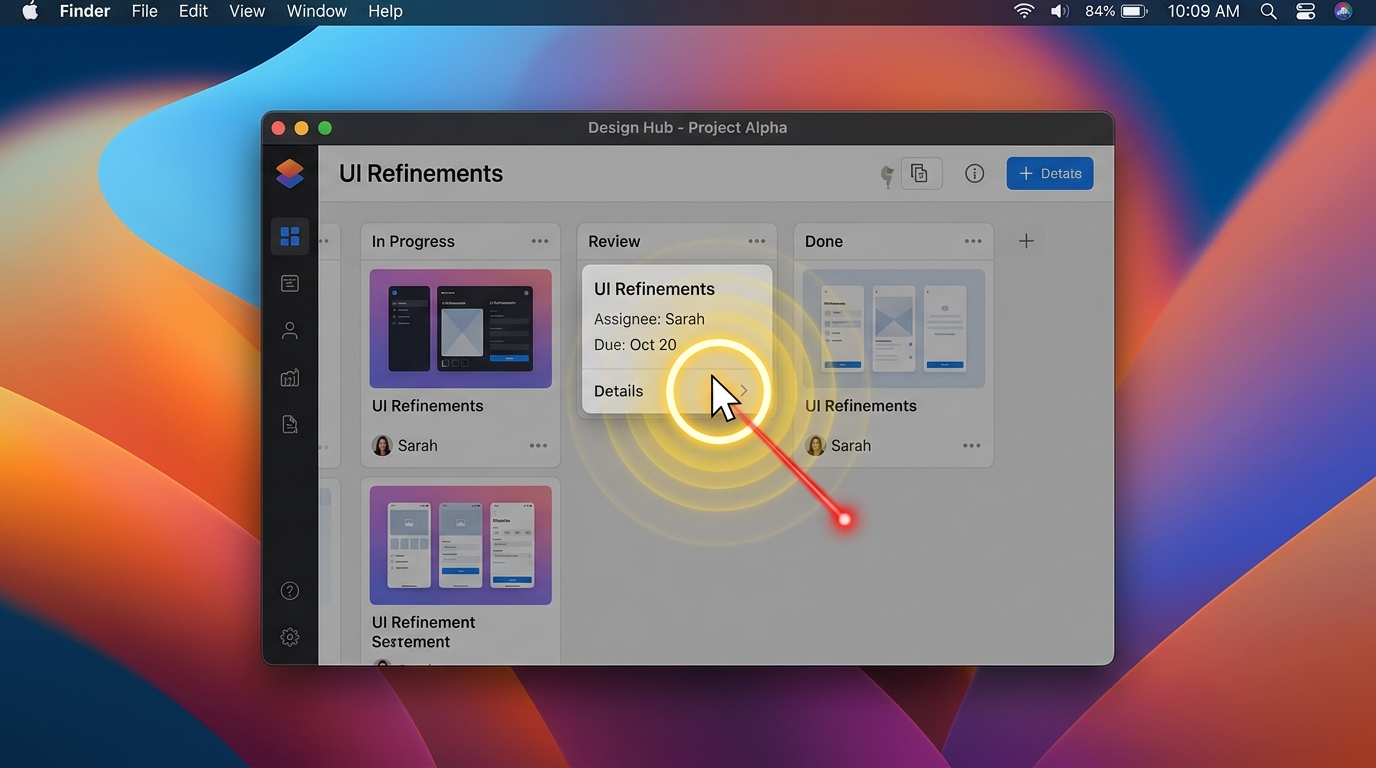
Never lose your mouse pointer on screen again.
Whether you’re presenting a keynote to executives, recording a software tutorial, or sharing your screen over Zoom, CursorGleam keeps your audience focused exactly where you want them.
Built exclusively for macOS, CursorGleam lives quietly in your menu bar and draws sleek, GPU-accelerated visual halos, click animations, and laser pointers around your mouse cursor — without cluttering your dock, degrading performance, or compromising privacy.
Three Focused Presentation Modes
CursorGleam provides three mutually exclusive modes tailored for different presentation scenarios:
1. Mouse Highlight (3 Refined Styles)
Surround your cursor with a beautiful, customizable halo that makes mouse movements impossible to miss on 4K, 5K, and Studio Displays:
- Filled Circle: Solid, soft halo for maximum contrast over busy code editors and documentation.
- Concentric Ring: Precision outer ring with a 20% inner targeting pip, keeping the exact tip of your cursor transparent and sharp.
- Soft Glow: Ambient radial glow for minimal, unobtrusive guidance during casual calls.
- Curated Palette: Pick from high-contrast Yellow (#FACC15), Apple Green, Blue, Red, Purple, White, or any custom color from the native macOS color picker.
- Idle Auto-Hide: Automatically fades away when the cursor remains still for 2, 3, 5, or 10 seconds, and reappears instantly upon movement.
2. Click Feedback (Ripple & Pulse)
Help viewers follow along by making every click visually memorable:
- Ripple Effect: Expanding concentric rings that anchor directly to the click coordinates.
- Pulse Effect: A brisk, energetic pop for rapid-fire interface interactions.
- Independent Controls: Separately toggle left and right click feedback so secondary clicks stand out.
- Click Safety: Animations stay anchored in space and never follow a moving cursor. Up to 8 concurrent animations are managed with zero lag.
3. Laser Pointer
Turn your Mac cursor into a digital presentation pointer:
- Vibrant central dot featuring a crisp white bright-core and smooth radial falloff.
- Available in presentation Red, Green, and Blue with Low, Medium, and High glow intensities.
- Perfect for Keynote slideshows, design reviews, and remote architecture whiteboarding.
Engineered for macOS
- Native Menu Bar Companion: Access every setting, switch modes, or adjust halo diameters (24–120pt) directly from a compact 340pt menu bar popup.
- Global Keyboard Shortcuts: Toggle Highlight (
⌃⌥H) or Laser (⌃⌥L) anywhere across macOS without clicking away from your active presentation window. - Multi-Monitor & Retina Ready: Transparent click-through overlay windows adapt automatically to external monitors, different scale factors, and full-screen spaces.
- Zero Dock Footprint: Operates as a pure background accessory; never clutters your macOS Dock or app switcher.
100% Private, On-Device & Respectful
- No Screen Recording Permissions: CursorGleam does not capture screen pixels or read your display buffer.
- No Keystroke Monitoring: Global hotkeys use standard macOS system APIs; no keylogging or text interception.
- No Account Required: No accounts, passwords, or telemetry servers. All settings are stored locally in your Mac’s sandbox.
Fair, Honest Pricing
Start with an unrestricted 7-Day Free Trial to test CursorGleam across all your real meetings and recordings. When you are ready, unlock it permanently for a single one-time payment of $4.99 (Pro Lifetime).
No subscriptions. No recurring monthly charges. No automatic renewals.
Pricing
See full details →Does CursorGleam record my screen or log keystrokes?
No. CursorGleam operates entirely in local transparent overlay windows. It never requests screen recording permissions, captures screen pixels, or monitors keystrokes.
How does the 7-Day Free Trial work?
You start the 7-day trial voluntarily inside the app. All features are fully unlocked. When the trial ends, effects pause gracefully without any automatic charge or surprise bill.
Does it work across multiple displays and 4K monitors?
Yes. CursorGleam creates native overlay windows for each connected display, handling multi-monitor arrangements, Retina scaling, and full-screen spaces seamlessly.
More calm apps
Other utilities created by dofun.app.
AllergyCard
A clear allergy info card for travel and emergencies.

CostCompare
Compare the real cost before you choose.
ChangeNote
Client scope change & revision log. Capture revision requests without getting lost in chat threads.