
InvoiceFollow
Unpaid invoice and payment reminder tracker. Keep cash flow steady without an overwhelming accounting suite.
Try all features unrestricted for 3 days. Unlock permanently via a one-time Lifetime purchase, or choose an annual pass. Zero ads, cancel anytime in Apple ID settings.
Instantly open in App Store
InvoiceFollow on iPhone
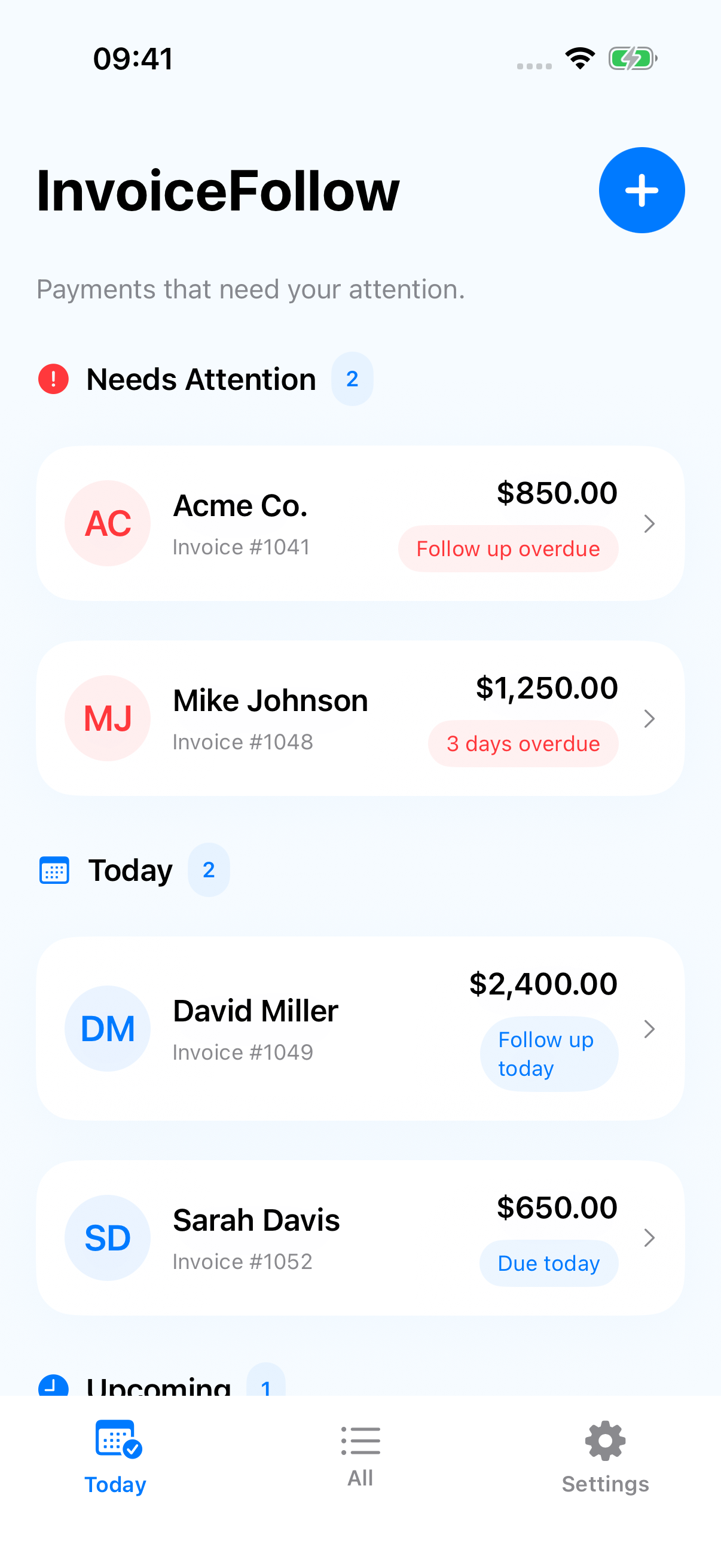
Know exactly what’s unpaid and when to follow up.
The hardest part of freelancing isn’t doing great work—it’s waiting to get paid:
- An invoice sent on Net-30 that is now 12 days overdue.
- A retainer check that the client “put in the mail last Friday.”
- A final milestone payment waiting on an accounts payable team.
When unpaid invoices slip your mind, your cash flow dries up. When you finally remember weeks later, reaching out feels awkward and uncomfortable.
InvoiceFollow acts as your calm financial safety net, organizing outstanding invoices by urgency and reminding you of the exact day to send a courteous nudge.
Core Highlights
- The Outstanding Dashboard: Categorizes receivables into clear visual groups:
Due Soon,Due Today, andOverdue. - Courteous Follow-up Templates: Copy polite, professional reminder messages directly into Mail or Messages with one tap.
- Follow-up Interaction Log: Keep a quick record of when you nudged the client and when they promised to disburse payment.
- One-Tap ‘Mark Paid’: Celebrate arriving revenue and archive receivables cleanly out of your active cash-flow view.
- Air-Gapped Privacy: Zero bank logins, zero third-party payment gateways, and zero tracking.
Perfect For
- Freelance writers, editors, and designers.
- Marketing consultants, agencies, and fractional executives.
- Photographers, videographers, and audio engineers.
- Independent tradespeople awaiting general contractor disbursements.
Pricing
See full details →Is InvoiceFollow an accounting or invoicing generator app?
No. You can create invoices in whichever system you like (FreshBooks, QuickBooks, Stripe, or a simple Word doc). InvoiceFollow focuses solely on what happens next: tracking when money is overdue and reminding you when to follow up.
How does it help me follow up without feeling awkward?
InvoiceFollow provides clean, friendly reminder templates (Day 1 Due, 7 Days Past Due, Final Notice) so you don't have to stress over how to word a courteous payment inquiry.
Does it connect to my bank account?
No. We never ask for bank logins, credit card details, or Plaid integrations. You manually tap 'Mark Paid' when payment arrives, keeping your banking 100% air-gapped and secure.
More calm apps
Other utilities created by dofun.app.

AllergyCard
A clear allergy info card for travel and emergencies.
CostCompare
Compare the real cost before you choose.
ChangeNote
Client scope change & revision log. Capture revision requests without getting lost in chat threads.