
Turn a Crumpled Paper Receipt into a Spreadsheet in Under 60 Seconds
Stop manually re-typing line items for company expense reports and tax deductions. Here is how on-device optical character recognition turns physical receipts into clean CSV files.
Anyone who travels for work, runs a freelance practice, or splits expenses with colleagues knows the Sunday evening ritual: sitting at a desk with a pile of faded, crumpled thermal paper receipts, manually transcribing numbers into a spreadsheet.
Corporate accounting platforms like Concur and Expensify frequently reject total-only receipts. They require itemized documentation: what dish was ordered, how much sales tax was paid, what the tip was, and whether any non-reimbursable personal purchases (like a magazine or personal snack) were mixed into the invoice.
Doing this manually is slow and error-prone. You squint at faded purple ink, type prices on a phone keypad, calculate percentages, and double-check arithmetic.
Here is how modern on-device computer vision simplifies receipt bookkeeping, and why you don’t need a bloated cloud subscription to do it.
Why Receipts Are Hard for Standard Document Scanners
Standard PDF document scanners treat receipts like photographs. They generate an image file, but the underlying data remains trapped as static pixels.
When you need the structured data — line items, quantities, taxes, and subtotal arithmetic — standard scanning falls short for several predictable reasons:
- Thermal Paper Distortion: Thermal paper fades rapidly when exposed to heat or sunlight, creating uneven contrast that trips up basic character recognition.
- Tabular Misalignment: Receipts rarely use strict grid borders. Prices sit on the far right edge of the paper, while descriptions sit on the left, often wrapping across multiple lines. Simple OCR tools easily confuse which price belongs to which item.
- Split Reimbursements: You might take a client to dinner and order two meals, but also buy a personal beverage on the same transaction. Manually calculating the proportionate tax on just the business portion requires tedious fraction math.
Best Practices for Frictionless Expense Logging
To make receipt processing take seconds rather than hours, follow three simple habits:
1. Flatten and Snap Immediately
Thermal paper degrades quickly inside leather wallets. Whenever you receive a paper receipt, place it on a contrasting flat surface (a dark table or notebook cover) and capture the image before putting it in your pocket. Good lighting prevents shadows across price columns.
2. Separate Items from Fees Early
Never dump an entire bill into an expense category without separating sales tax and gratuity. Tax authorities and corporate finance teams require tax to be booked in distinct accounts for audit compliance.
3. Keep Clean, Open Exports
Avoid locking receipt records inside proprietary accounting databases that charge recurring monthly fees just to view your historical archives. Keep your verified data in standard, open formats: CSV files that open in Excel, Numbers, and Google Sheets, alongside a tidy PDF receipt image.
How ItemizeReceipt Streamlines the Process
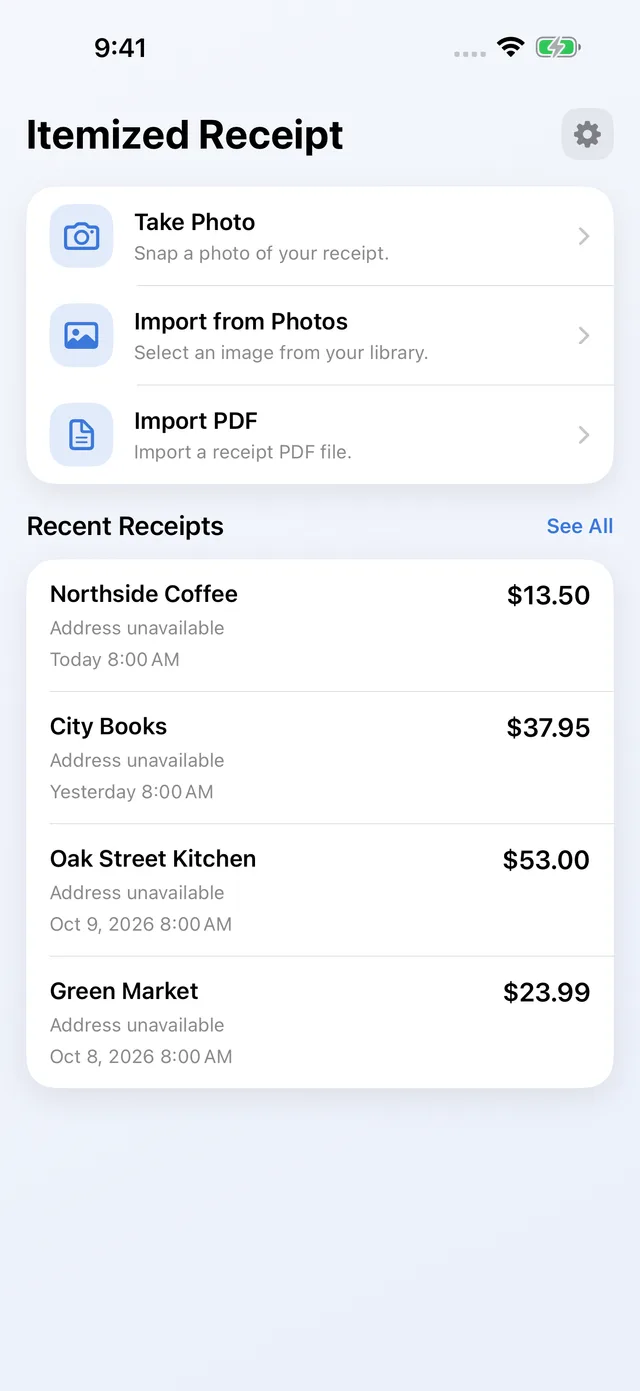
We built ItemizeReceipt to solve the receipt problem as a straightforward, single-purpose iOS tool.
- Instant On-Device Line Detection: Using Apple’s native Vision framework, ItemizeReceipt analyzes receipt structures locally on your iPhone in under three seconds. It pairs item descriptions with their corresponding prices, isolates taxes, and verifies subtotals against the printed grand total.
- Single-Tap Business vs. Personal Splits: Mark any line as Business or Personal. ItemizeReceipt automatically recalculates proportional taxes and tips, outputting a precise reimbursable total.
- Fast Numeric Editing: Thermal paper can be blurry. If an item name or digit was scanned imperfectly, tap the row to adjust it instantly with an oversized numeric keypad.
- Export to CSV, PDF, and Plain Text: With one tap, export a structured CSV ready for your accountant, or generate a tidy PDF with the original receipt image paired alongside verified line totals.
On-Device OCR and Private Apple iCloud Sync
Receipts can contain payment fragments, transaction times and store locations. ItemizeReceipt recognizes receipt text and calculates totals on your device, without uploading images to an OCR service.
Saved receipt images, line items, folders, tags and reports can synchronize through your Apple CloudKit private database when iCloud is available. No separate app account is needed, and dofun does not operate a receipt-storage server. Offline changes can synchronize when connectivity returns.
Files you export or share are separate copies. Deleting the app does not remove those files or cloud backups. Read the ItemizeReceipt privacy policy for sync, retention and deletion details.
Fair, Honest Pricing
ItemizeReceipt offers a free download. Eligible new subscribers can try the Annual Pro plan free for 3 days; Monthly and Lifetime purchases do not include this trial. Prices below are in USD and may vary by region.
- Annual Subscription: $9.99/year.
- Lifetime License: $19.99 one-time purchase.
Stop typing out paper receipts by hand. Download ItemizeReceipt on the App Store and turn your receipt piles into clean spreadsheets in seconds.

Itemized Receipt
Scan receipts on iPhone or iPad, check editable line items, and export PDF or CSV records. The Mac app also imports receipt images and PDFs.

Open in the App Store
Open in the App Store